Match the right row
Use the original image's width and height in pixels. A screenshot or messaging-app copy may have been resized.
Reference chart · 72 to 300 PPI
Compare common image dimensions without recalculating every row. Each value uses the same formula: pixels divided by PPI equals physical inches.
Jump to the chart PDF & CSV downloadsMain chart · 01
These are mathematical dimensions, not guaranteed print-quality ratings. Use the PPI requested by the printer or production service.
On a small screen, scroll the table sideways to see the 96, 150 and 300 PPI columns.
| Pixel dimensions | 72 PPI | 96 PPI | 150 PPI | 300 PPI |
|---|---|---|---|---|
| 640 × 480 px | 8.89 × 6.67 in | 6.67 × 5 in | 4.27 × 3.2 in | 2.13 × 1.6 in |
| 750 × 1050 px | 10.42 × 14.58 in | 7.81 × 10.94 in | 5 × 7 in | 2.5 × 3.5 in |
| 1080 × 1080 px | 15 × 15 in | 11.25 × 11.25 in | 7.2 × 7.2 in | 3.6 × 3.6 in |
| 1080 × 1920 px | 15 × 26.67 in | 11.25 × 20 in | 7.2 × 12.8 in | 3.6 × 6.4 in |
| 1280 × 720 px | 17.78 × 10 in | 13.33 × 7.5 in | 8.53 × 4.8 in | 4.27 × 2.4 in |
| 1920 × 1080 px | 26.67 × 15 in | 20 × 11.25 in | 12.8 × 7.2 in | 6.4 × 3.6 in |
| 2048 × 2048 px | 28.44 × 28.44 in | 21.33 × 21.33 in | 13.65 × 13.65 in | 6.83 × 6.83 in |
| 2400 × 3000 px | 33.33 × 41.67 in | 25 × 31.25 in | 16 × 20 in | 8 × 10 in |
| 2550 × 3300 px | 35.42 × 45.83 in | 26.56 × 34.38 in | 17 × 22 in | 8.5 × 11 in |
| 3000 × 3000 px | 41.67 × 41.67 in | 31.25 × 31.25 in | 20 × 20 in | 10 × 10 in |
| 3600 × 5400 px | 50 × 75 in | 37.5 × 56.25 in | 24 × 36 in | 12 × 18 in |
| 3840 × 2160 px | 53.33 × 30 in | 40 × 22.5 in | 25.6 × 14.4 in | 12.8 × 7.2 in |
| 4000 × 6000 px | 55.56 × 83.33 in | 41.67 × 62.5 in | 26.67 × 40 in | 13.33 × 20 in |
Single edge · 02
Use this table when you have one pixel value rather than a width × height pair.
| Pixels | 72 PPI | 96 PPI | 150 PPI | 300 PPI |
|---|---|---|---|---|
| 192 px | 2.67 in | 2 in | 1.28 in | 0.64 in |
| 300 px | 4.17 in | 3.125 in | 2 in | 1 in |
| 320 px | 4.44 in | 3.33 in | 2.13 in | 1.07 in |
| 700 px | 9.72 in | 7.29 in | 4.67 in | 2.33 in |
| 900 px | 12.5 in | 9.375 in | 6 in | 3 in |
| 1000 px | 13.89 in | 10.42 in | 6.67 in | 3.33 in |
| 1080 px | 15 in | 11.25 in | 7.2 in | 3.6 in |
| 1224 px | 17 in | 12.75 in | 8.16 in | 4.08 in |
| 1350 px | 18.75 in | 14.06 in | 9 in | 4.5 in |
| 1500 px | 20.83 in | 15.625 in | 10 in | 5 in |
| 1650 px | 22.92 in | 17.19 in | 11 in | 5.5 in |
| 2048 px | 28.44 in | 21.33 in | 13.65 in | 6.83 in |
| 2304 px | 32 in | 24 in | 15.36 in | 7.68 in |
| 2400 px | 33.33 in | 25 in | 16 in | 8 in |
| 3000 px | 41.67 in | 31.25 in | 20 in | 10 in |
| 3600 px | 50 in | 37.5 in | 24 in | 12 in |
Use it well · 03
The chart answers physical-size math. It does not inspect image sharpness, compression, focus, color, printer capability, or viewing distance.
Use the original image's width and height in pixels. A screenshot or messaging-app copy may have been resized.
If a printer specifies a value, use that column or enter the exact PPI in the calculator rather than choosing the nearest preset.
An image and a print may have different aspect ratios. Cropping removes pixels, so calculate again with the final cropped dimensions. See the 10 × 8 crop-versus-fit example before ordering.
Questions · 04
It is 20 × 11.25 inches at 96 PPI, 12.8 × 7.2 inches at 150 PPI, or 6.4 × 3.6 inches at 300 PPI.
One 1080-pixel edge is 11.25 inches at 96 PPI, 7.2 inches at 150 PPI, or 3.6 inches at 300 PPI.
300 pixels is 4.17 inches at 72 PPI, 3.125 inches at 96 PPI, 2 inches at 150 PPI, or 1 inch at 300 PPI.
At 96 PPI, 900 pixels is 9.375 inches and 1000 pixels is 10.42 inches. At 300 PPI, they are 3 inches and 3.33 inches.
Because physical size depends on PPI. Higher PPI packs the same pixels into fewer inches; lower PPI spreads them across more inches.
Free resources · 05
Use the print-ready PDF, work with the source data, or add the compact chart to a relevant guide. The files use the same pixels ÷ PPI formula as the calculator.
A landscape US Letter chart with common pixel values, image dimensions, PPI guidance, and a QR link back to the live calculator.
Download PDFSingle-edge and width × height values with separate inch columns for 72, 96, 150, and 300 PPI.
Download CSV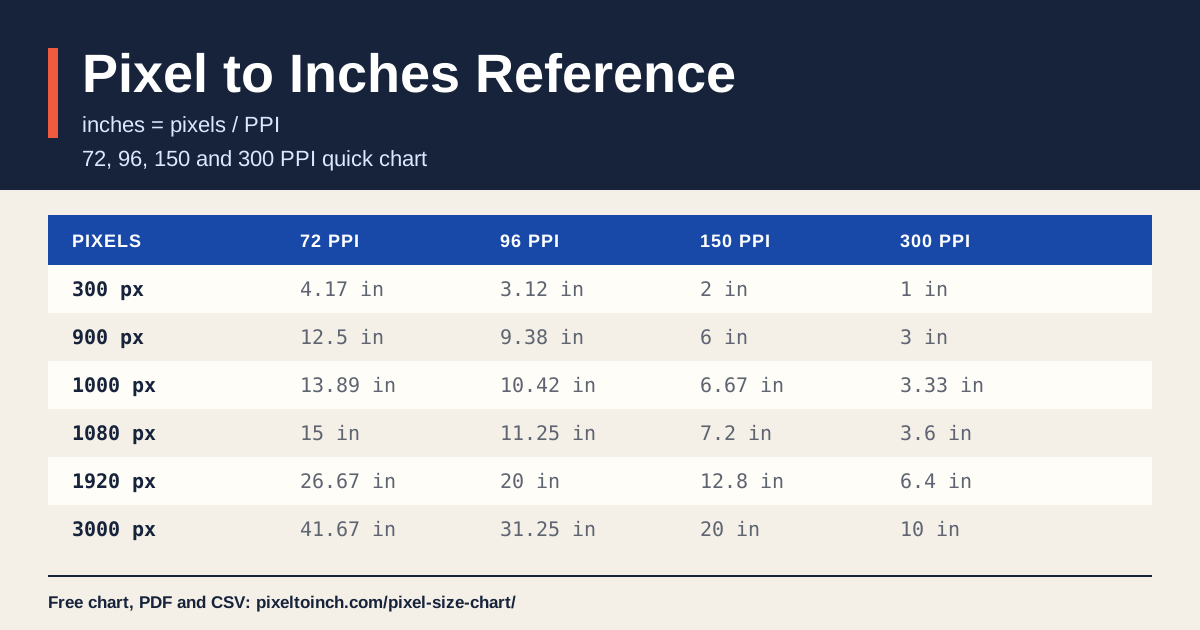
Suggested attribution: “Pixel-to-inch reference by PixelToInch.com.” You may share the downloadable files unchanged; link to this page when republishing online.